AI copilot for ERPNext and Frappe

Ask your ERP. Approve what it drafts.

Frappe Copilot lives inside your ERPNext Desk. It answers from live data, turns invoices and receipts into draft records, and waits for your yes before anything is saved.

  • Sees only what the signed-in user can see
  • Every write is a draft you review first
  • Brings in only the skills each request needs
  • Bring your own model, or run one yourself
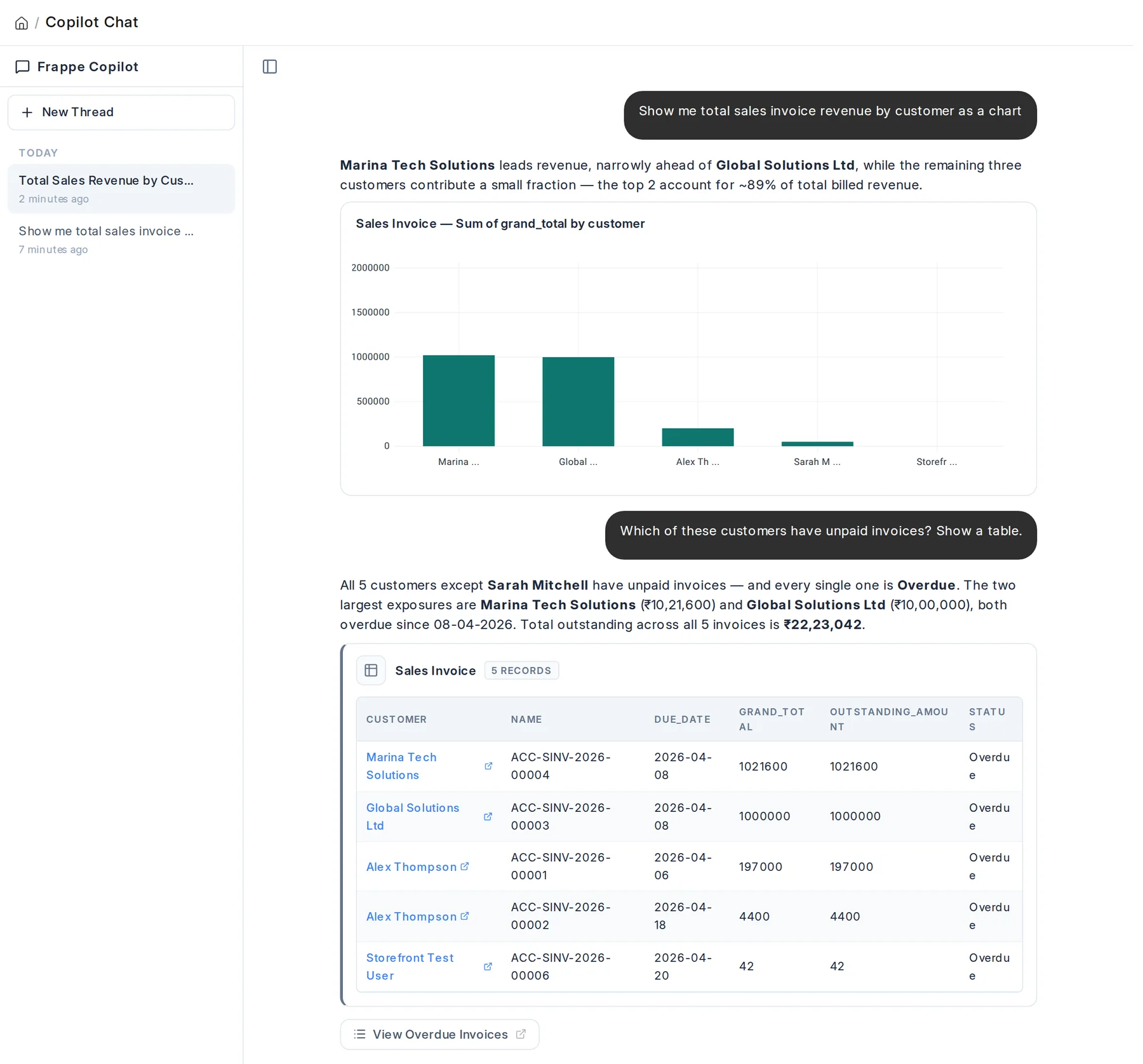
Frappe Copilot chat: revenue by customer as a bar chart, then a table of overdue sales invoices, answered from live ERPNext data.
31tools the agent can call
13built-in skills across ERPNext
6ways to connect a model
0writes without your approval

Built for

ERPNext v16 Frappe v16 Your own custom DocTypes

From a question to a record, with you in the loop

These are real screens from Frappe Copilot, running on a test site with sample data.

1

Ask in plain language

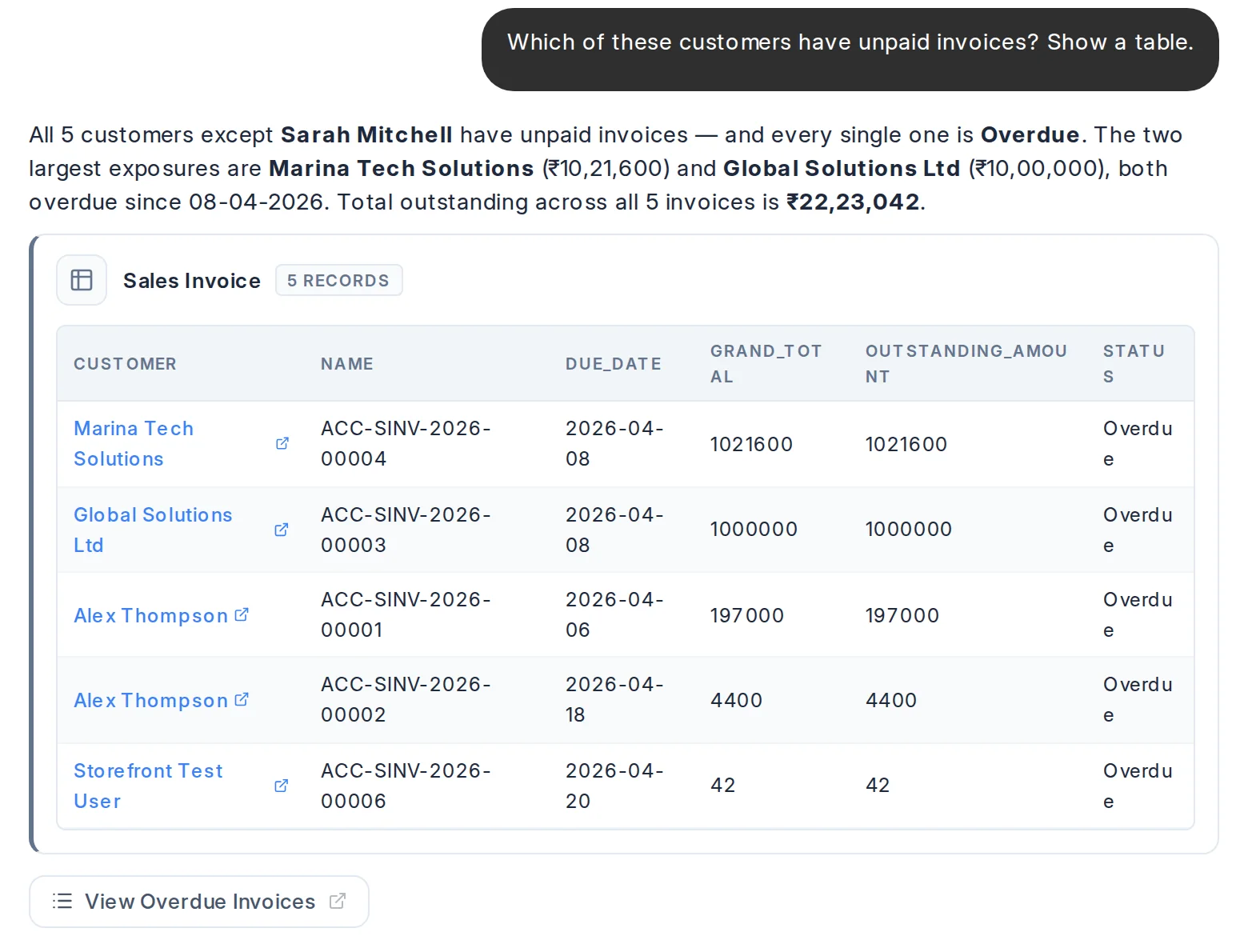
The agent plans, calls the tools it needs, reads the results and keeps going until the question is answered. Answers stream in as sentences, sortable tables or charts, never as raw HTML.

  • Records, totals, full-text search, linked-document tracing and your saved reports
  • Mention any record or DocType with @, or start with /find, /diagnose, /trace or /report
  • Replies in each user's own language

Asked which customers have unpaid invoices, Copilot answers with a summary and a table of five overdue sales invoices.
2

Review the draft, then confirm

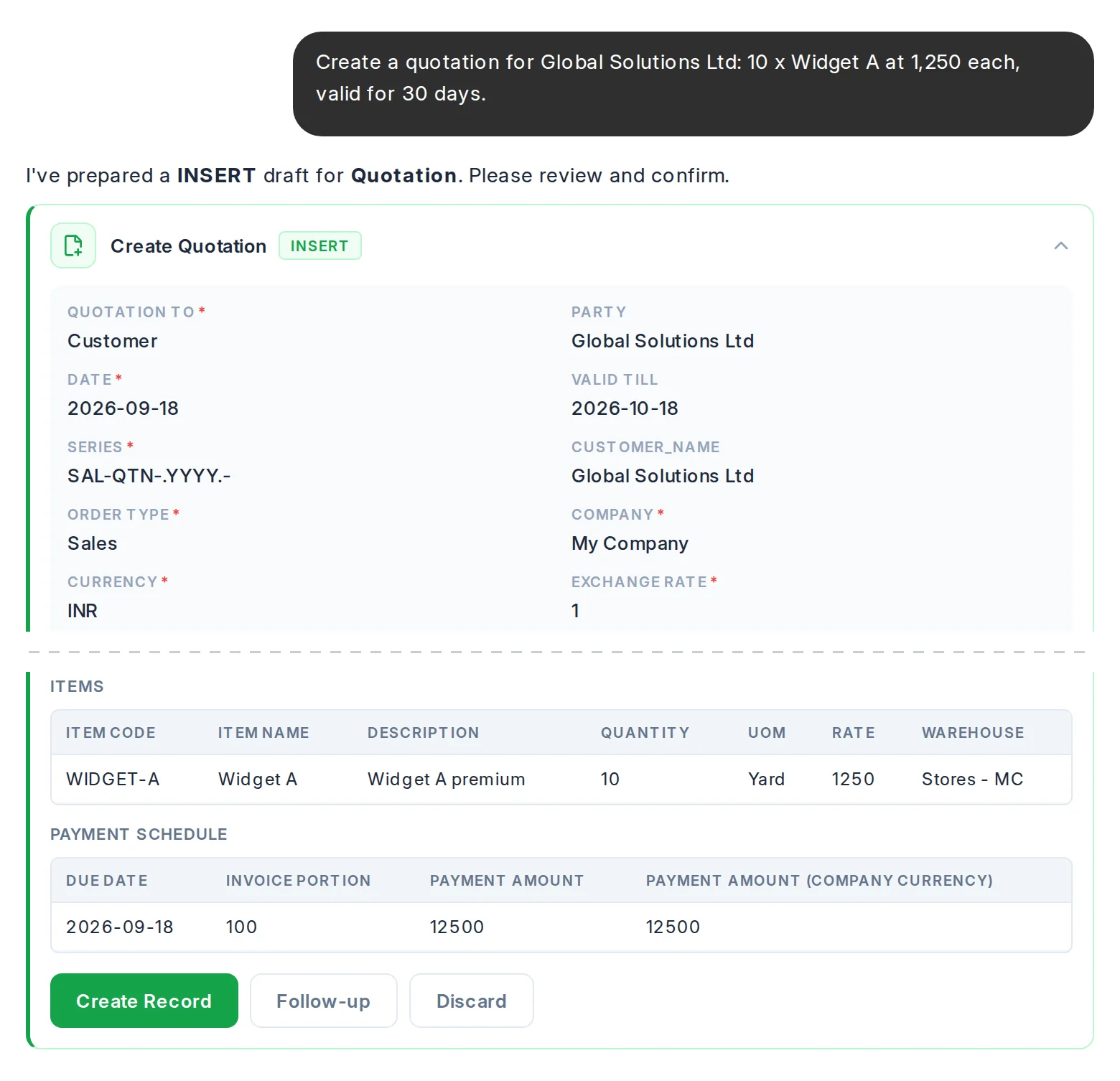
Ask it to create or change something and you get a review card, not a saved record. Fields use their proper types, child tables are editable, and nothing lands until you press Create.

  • Checked in a dry run first, so validation errors show up before you confirm
  • Want a change? Press Follow-up and say it in chat
  • Missing required fields are asked for in a short form
A draft Quotation for 10 units of Widget A shown as a review card, with Create Record, Follow-up and Discard buttons. Some header fields are cut from this image.
3

Drop in a document

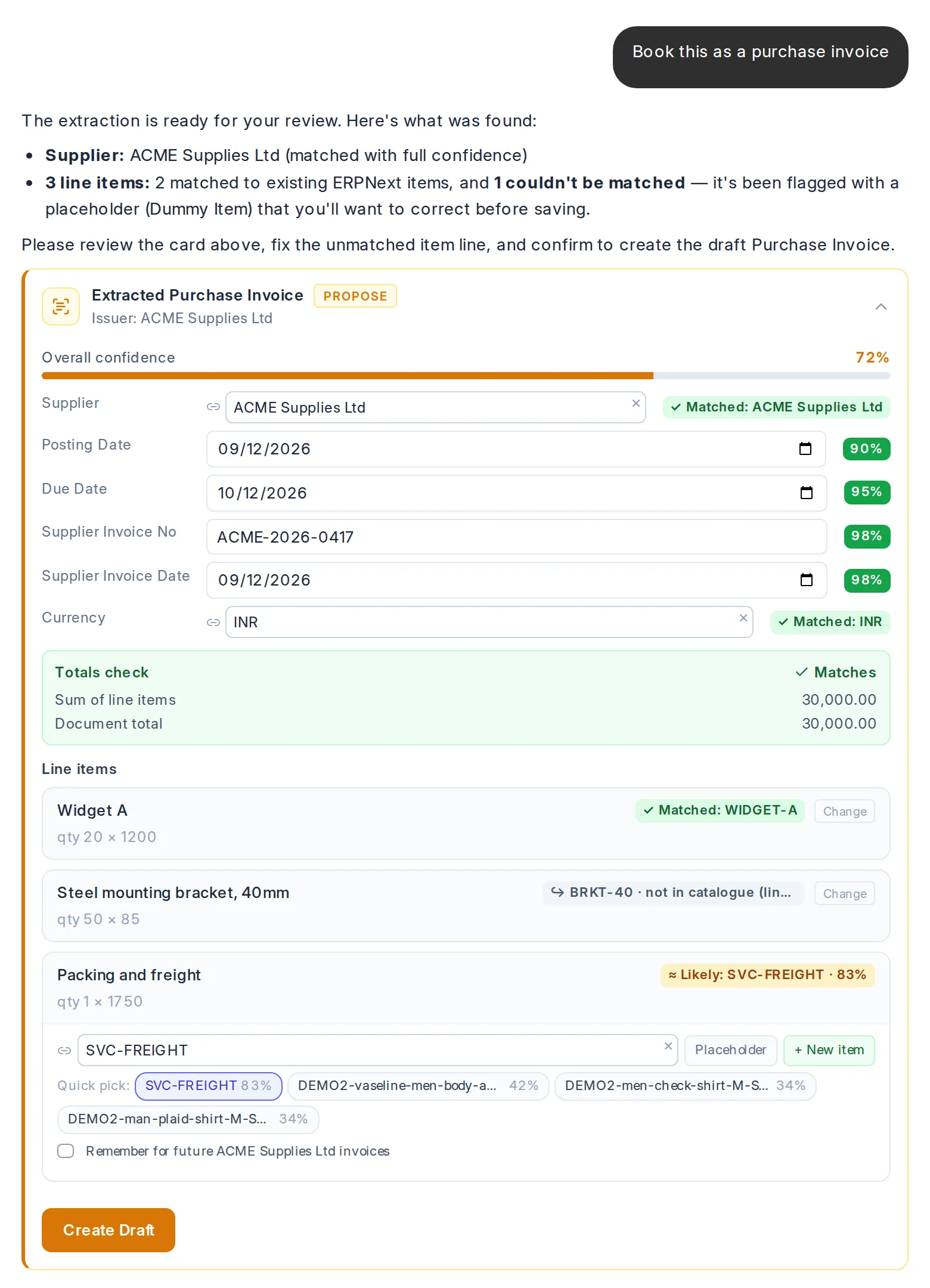
Attach a supplier invoice or a receipt and say what it is. Frappe Copilot reads it on your server, matches the supplier and each line to your records, checks the totals, and hands you a draft.

  • Digital and scanned PDFs, photos, and e-invoices, including ZUGFeRD, Factur-X and XRechnung inside a PDF
  • Several files in one message, each read and drafted in turn
  • A confidence score on every field; uncertain lines show ranked candidates instead of a guess
  • Creates a missing supplier, customer or item without duplicates, and remembers a supplier's item codes
  • The source file is attached to the record it becomes
An extracted purchase invoice from ACME Supplies Ltd: supplier matched, totals check passing, two lines matched and one line offering ranked candidates.

Smarter than a chat window

What sets it apart from pasting questions into a general-purpose AI.

Picks the right skills for every request

A general chat AI brings the same everything to every message. Frappe Copilot first works out what you're asking for, whether that's a lookup, a draft or an analysis, and brings in only the know-how and tools that job needs.

  • Sharper answers, and a smaller AI bill on every turn
  • A quick hello or thank-you costs next to nothing
  • Ask for something the current workspace can't do, and it points you to the right one instead of half-answering

Book this supplier invoice

Brought in for this request
Purchase cycleDocument extractionItem matching
Left out
SalesHR & payrollManufacturingCRMSetup
Illustration

Shows its work as it goes

No spinner followed by a wall of text. You watch each step happen, and every answer can show how it got there.

  • A live list of what it's doing, ticked off step by step
  • Result cards appear the moment each one is ready
  • Switch on Think for a hard question and follow its reasoning live, then fold it away above the answer
  • For admins, a panel per chat: which skills were loaded, which tools ran, and how much came from cache

Book this supplier invoice

  • Reading acme-invoice.pdf
  • Matching the supplier
  • Matching 3 line items
  • Calculating totals
  • Preparing the draft12s

Reasoning · The freight line has no exact item match, so I'll offer the closest candidates instead of picking one.

Illustration

Prompt caching

It pays once for what doesn't change. The stable parts of each request, and the conversation so far, are reused from cache on the next turn, so follow-up questions cost a fraction of the first one.

A turn summary in chat: 2 LLM calls, 17,674 tokens in, 10,620 of them served from cache.

Caching applies when the model is served by Anthropic.

Context that compacts itself

Long conversations stay sharp. As a chat grows, older turns are compacted automatically, keeping the figures, records and decisions that matter, so you never have to start a fresh chat to get a good answer again.

  • Keep working in one chat instead of starting over
  • Numbers keep their meaning from one question to the next

A knowledge base for every skill

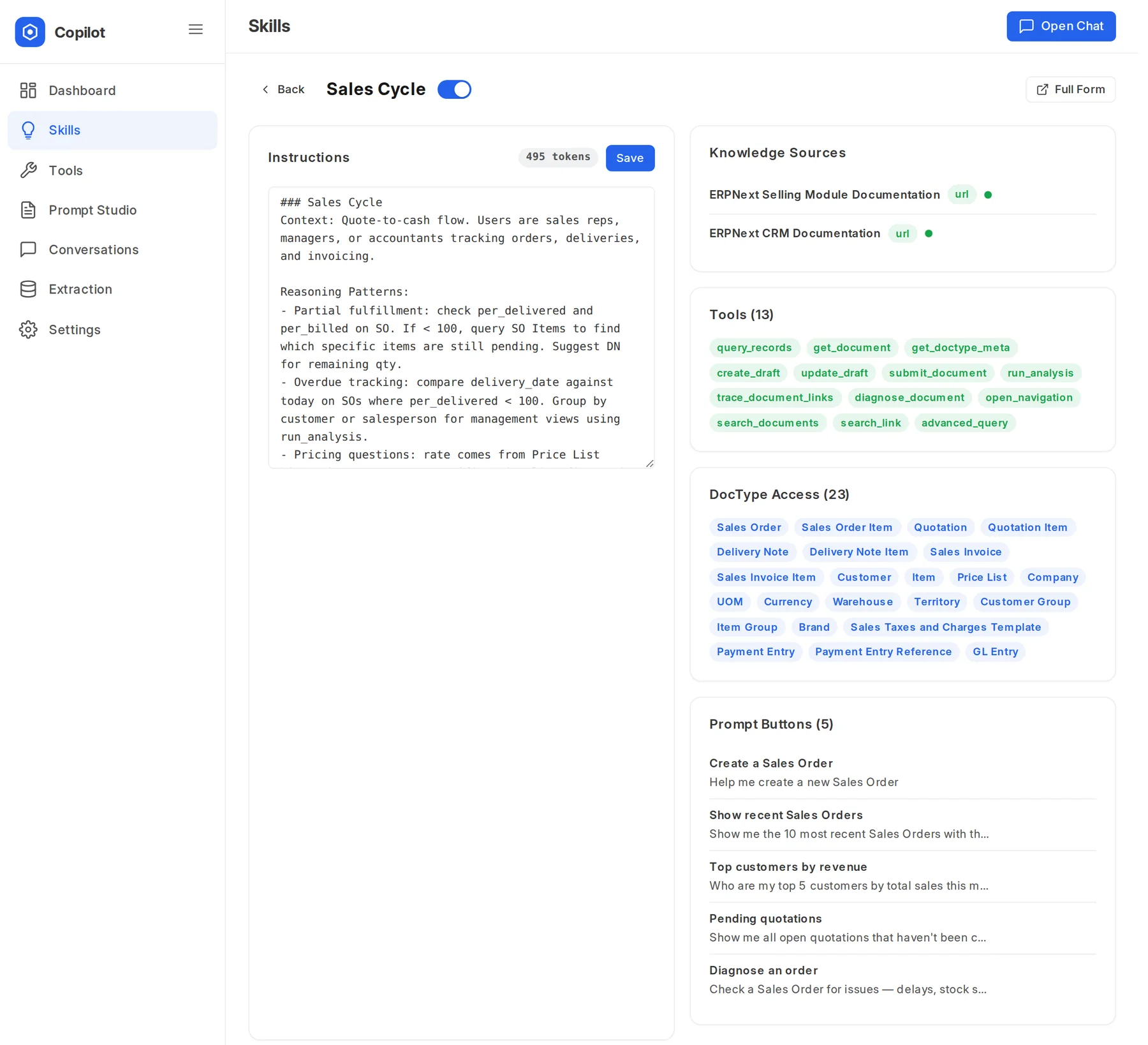
Teach it how your business works. A skill is a record you edit in the Desk: its instructions, the record types it may use, its tools and its starter prompts. Attach documentation, a web page or your own notes, and it looks them up when a question needs them.

  • Edit a skill and the very next message uses it
  • Can also search the Frappe Wiki pages a skill points to
The Sales Cycle skill: instructions, two documentation knowledge sources, 13 tools, 23 DocTypes and five prompt buttons.

Prompt templates & versioning

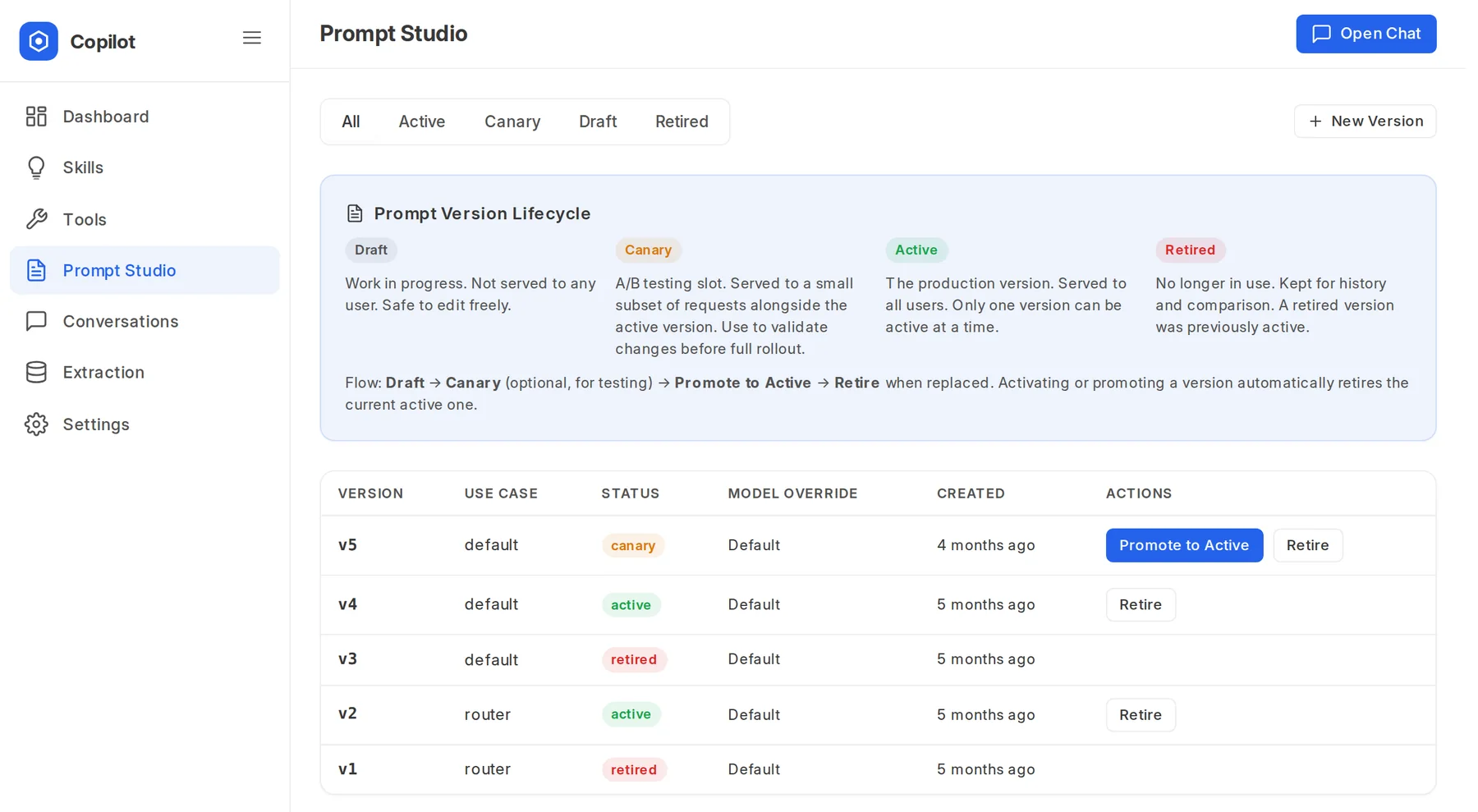
Every system prompt is a versioned record. Try a new version, promote it when you're happy, and keep the full history. Upgrades never overwrite your edits.

  • Pin a model to a prompt version
  • Each use case keeps its own version history
Prompt Studio listing prompt versions by use case with their draft, canary, active or retired status.

A real calculator

Totals, margins and conversions are worked out in a sandbox, not guessed by the model.

Provider failover

Add more than one AI provider. If one is rate-limited or down, the work carries on with the next.

Credits and budgets

Per-user credits with a warn or block limit, and a ledger of what used them. Failed steps and small talk are free.

Code-aware answers optional

Ask where a validation lives or which app changes a behaviour, and get file and line references.

It already knows how ERPNext works

Built-in skills cover the main ERPNext flows. Pick a team to see the kind of thing you can ask.

Top customers by revenue

Who are my top 5 customers by total sales this month?

A chart and the numbers behind it, straight from your invoices.

Diagnose an order

Check SO-00412 for problems.

Delays, stock shortages and missing invoices, found by following the order's links.

Draft a quotation

Quote Global Solutions 10 of Widget A at 1,250, valid for 30 days.

A review card with the prices and taxes filled in, ready for you to confirm.

Built around how your team works

Separate places for separate jobs, and ready-made playbooks for the work you repeat.

Six workspaces

Ask, Create, Find, Analyze, Automate and Migrate. Find and Analyze can never change data, whatever is asked, and an admin decides who can use which.

One-click Actions

18 ready-made playbooks, such as Invoice Posting Run, Receivables Chasing, Revenue Trend and Period Close. Each one brings just the tools it needs, and can be limited by role.

Chats you can find again

Group conversations into projects, search and archive them. Titles update as a chat finds its subject, and each thread stays tied to its company.

AI near your books, on your terms

The rules Frappe Copilot is built on. None of them can be skipped by the model.

It runs as you

Every tool call is checked against Frappe permissions for the signed-in user. If you can't open a record, neither can Copilot.

You grant the scope

Before it reads a new kind of record in a conversation, it asks which DocTypes it may use, then carries on once you allow them.

Sensitive fields stay masked

Fields an admin marks sensitive reach the model as [REDACTED]. DocTypes marked off-limits are never touched.

Drafts before writes

Creates and updates wait for confirmation. Reading, drafting, submitting and deleting are separate switches, and deleting starts switched off.

Every call on the record

An audit log of each turn: user, tool, model, tokens and the policy decision. Full LLM traces for debugging, and safety events when something looks wrong.

Read-only where it counts

The Find and Analyze workspaces can't write, and calculations run in a locked-down sandbox that can't change your data.

Bring your own model

Connect one provider or several. Test the connection, fetch the available models and choose per tier, all from the admin centre.

OpenAI Anthropic Google Gemini Groq Azure OpenAI Any OpenAI-compatible endpoint

Self-host with Ollama, vLLM or LiteLLM through the OpenAI-compatible option. Product names belong to their owners.

One admin centre for all of it

A three-step setup wizard gets you running. Then usage, skills, tools, prompts, conversations, extraction and settings each have their own page.

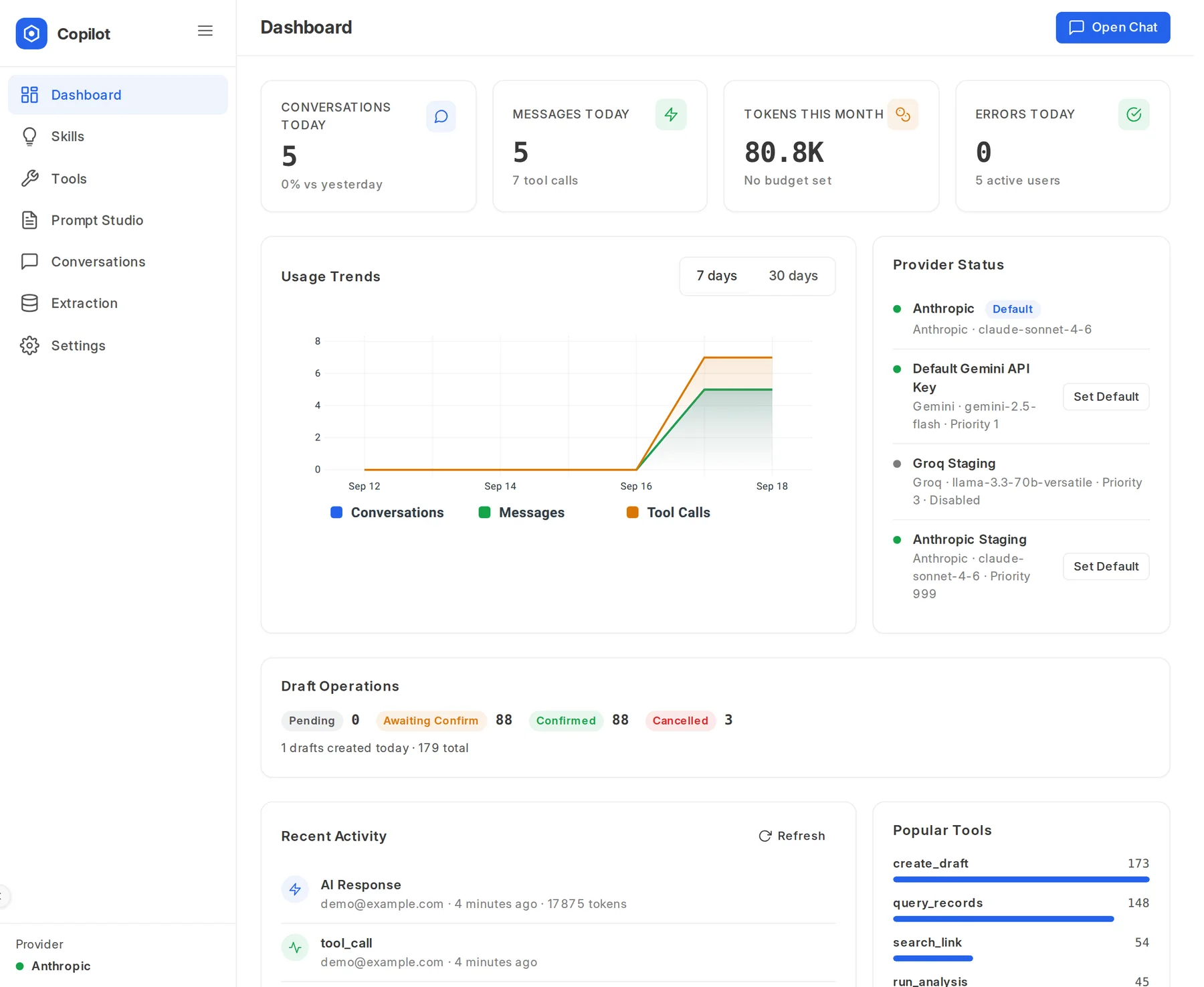
Admin dashboard: conversations, messages, tokens this month, usage trends, provider status, draft operations and popular tools.
Usage at a glance. Tokens, drafts, providers and the tools people use most.
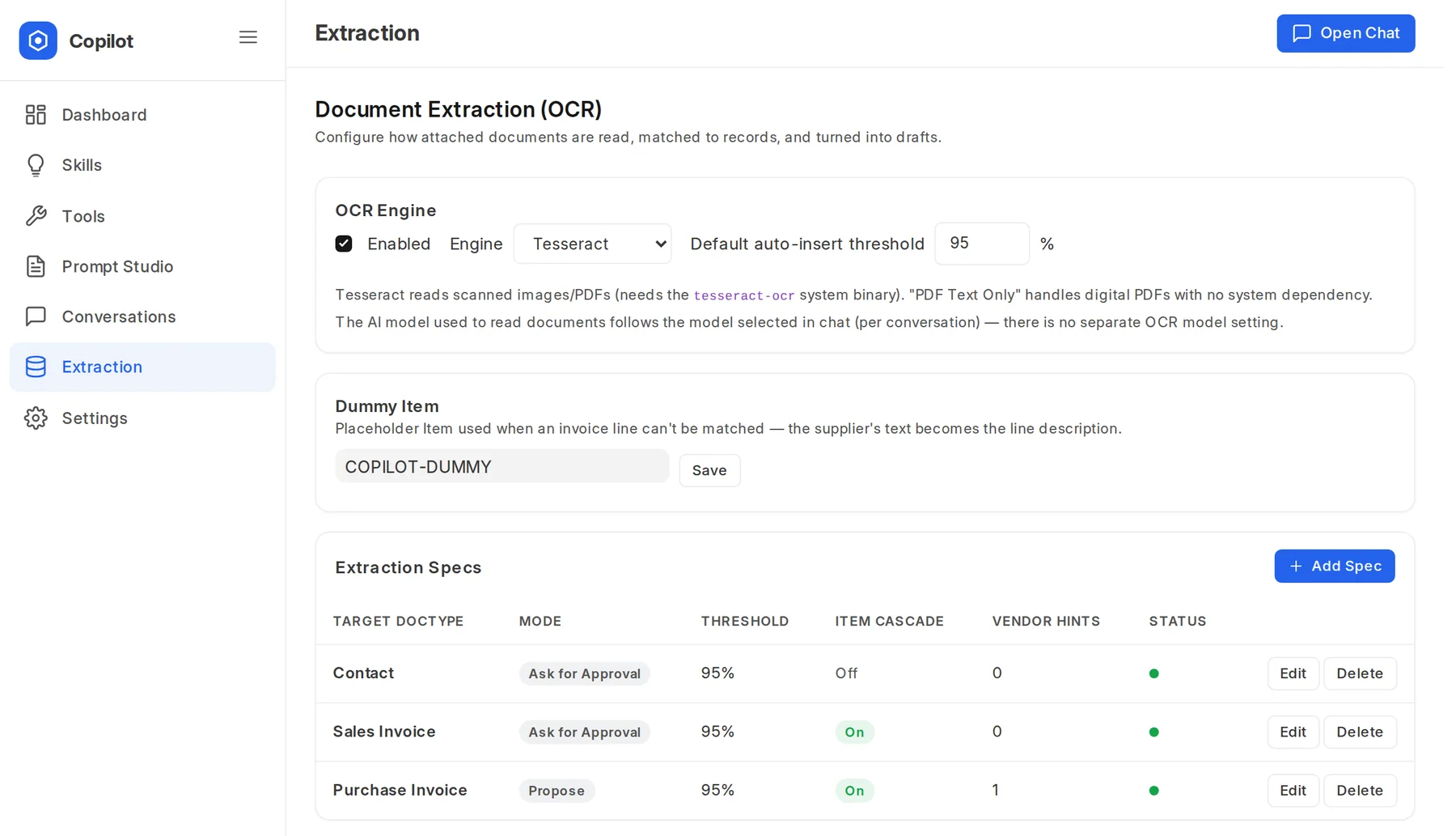
Extraction settings: OCR engine, a placeholder item for unmatched lines, and extraction specs per DocType with mode, threshold and vendor hints.
Extraction, per DocType. Choose whether a document is auto-inserted above a confidence threshold, sent for approval or always drafted, and add hints per vendor.

On every Desk page

A floating chat widget opens from any page, stays in step across tabs and knows the record you're looking at.

Mentions and context

Pull any record into the prompt with @. Only the ones you're allowed to see are offered.

Prompt buttons

Each skill brings one-click starters, like "Diagnose an order" or "Pending quotations".

Your language

Answers follow each user's language setting in Frappe.

Questions

How is it different from using ChatGPT or Claude directly?

A general chat AI only knows what you paste into it. Frappe Copilot works inside your ERPNext with live data and your permissions, brings in only the skills and tools each request needs, shows each step as it works, and turns answers into draft records you approve.

Do I need ERPNext?

It is built for ERPNext, and its skills know the sales, buying, stock, accounting, HR and manufacturing flows. The core tools work on any Frappe DocType, including the ones in your own apps.

Can it change my data without asking?

No. Every create or update arrives as a draft card, and nothing is saved until you confirm it. Submitting, cancelling and deleting are separate switches for an admin, and deleting is off by default.

What does the AI get to see?

Only what the signed-in user can see, only from the record types approved for that conversation, and with sensitive fields replaced by [REDACTED] before anything is sent to the model. Record types an admin marks off-limits are never touched.

Which AI models does it use?

You choose. It works with OpenAI, Anthropic, Google Gemini, Groq and Azure OpenAI, or any OpenAI-compatible endpoint, such as a model you host yourself. Add more than one and it moves to the next provider when one is rate-limited or down.

Does it copy my data into a separate index?

No. There is no vector index and no stale copy of your database. Every answer comes from tools that read your live records, with your permissions, at the moment you ask.

Which documents can it read?

Digital and scanned PDFs, photos and images, e-invoices such as FatturaPA, ZUGFeRD, Factur-X and XRechnung, including ones embedded in a PDF, and CSV, JSON, text and HTML files. Reading happens on your server. Purchase Invoices, Sales Invoices, Expense Claims and Contacts work out of the box, and an admin can add a spec for any other DocType.

Want Frappe Copilot on your site?

Tell me about your ERPNext setup and what you'd like to hand over, and I'll get back to you.